 Just Pick Your Favorite Stylish Watch online

Hot Search:
Garmin Handlebar Controller, Use on Snowmobile, Motorcycle or ATV

Items Description
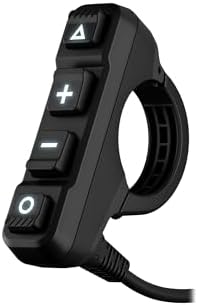
The Garmin Handlebar Controller is a wired handlebar-mounted remote designed for snowmobile, motorcycle, and ATV riders who need to operate a compatible Garmin navigator without lifting their hands from the grips. Rather than reaching across the bars to tap a screen, riders use a compact button cluster that maps zoom, map panning, music control, and waypoint marking to physical keys positioned within thumb reach. It is an accessory built around a single practical problem: keeping attention on the trail while the navigator stays under command.
The controller is intended for riders running a Garmin Tread series powersports navigator or a zūmo XT2 motorcycle navigator, and it connects to the host device by wired power for consistent operation rather than relying on a separate battery. Garmin specifies versatile mounting hardware for most motorcycles, snowmobiles, and ATVs, and every input is sized for use with riding gloves on. Viewed on its own, it is a small part of a larger cockpit, but it changes how often a rider's hands leave the bars during a route.
Key Advantages of the Garmin Handlebar Controller for Snowmobile, Motorcycle and ATV Navigation, Glove-Friendly Wired Remote for Tread and zūmo XT2 Devices
1. Control Mapping Built Around Riding Gloves
Every button on the controller is shaped and spaced for actuation with a gloved thumb rather than a bare fingertip. The layout is deliberately small in key count and large in key size, which reduces the chance of pressing the wrong input when the bike is moving over loose gravel, washboard trail, or packed snow.
- Glove-Friendly Actuation: Physical keys sized for use with winter or summer riding gloves.
- Thumb-Reachable Layout: Mounts beside the grip so inputs stay inside natural thumb travel.
- Short-Travel Keys: Distinct tactile feedback lets riders confirm a press without looking down.
2. Map Zoom and Pan Without Leaving the Grips
Zooming in and out on a moving map is the most repeated action on a trail navigator, and it is the function the controller is most directly organised around. Dedicated zoom keys remove the need to pinch or tap a touchscreen at speed, while the remaining inputs cover map movement and on-screen selection. This matters most in two situations: picking the correct fork on a fast forest road, and adjusting the view when a planned track runs close to a parallel trail.
- Dedicated Zoom Keys: Separate inputs for zooming in and out on the active map.
- On-Screen Navigation: Buttons for moving through menus and confirming selections.
- Screen-Off Operation: Riders keep both hands on the bars while adjusting the view.
3. Versatile Mounting for Motorcycle, Snowmobile and ATV Bars
Garmin states that the controller includes versatile mounting options intended to fit most motorcycles, snowmobiles, and ATVs. That range covers very different handlebar diameters and clamp environments, from slim snowmobile bars to thick ATV risers, so the same part can move between machines or be shared across a seasonal setup.
- Multi-Vehicle Fitment: Designed for motorcycle, snowmobile, and ATV handlebars.
- Included Mounting Hardware: Clamp and fixture components supplied with the controller.
- Relocatable Setup: Can be repositioned or moved between machines as needed.
4. Wired Power for Predictable Operation
The controller draws power over a wired connection instead of carrying its own cell. For riders, that removes a charging routine and a battery state to monitor before a cold-morning start, and it keeps the unit operating for the full length of a ride as long as the navigator has power. There is no pairing step and no intermittent wireless link to troubleshoot at the trailhead.
- Wired Connection: Powered through the navigator rather than an internal battery.
- No Pairing Required: No wireless setup routine before a ride.
- Consistent Response: Input latency is not dependent on a radio link.
5. Music and Ride Functions from the Bars
Beyond navigation, the controller handles media and ride-related functions on a compatible navigator, including music control and waypoint marking. Riders who run audio through the navigator can change tracks or adjust playback without unlocking a phone or touching a screen, and a point of interest or hazard can be marked at the moment it is passed rather than reconstructed afterwards.
- Music Control: Playback buttons for audio routed through the navigator.
- Waypoint Marking: Save a location without stopping the ride.
- Group Ride Support: Works alongside navigator features for shared route riding.
6. Compatibility with Garmin Powersports Navigators
The controller is listed for use with Garmin Tread devices, including the Tread 2 line, and with the zūmo XT2 motorcycle navigator. Because it is a first-party Garmin accessory, layout and function keys are matched to the navigator's menus rather than approximated through a third-party button mapping. Riders should confirm their specific navigator model supports the handlebar controller before purchase.
- Tread Compatibility: Intended for Garmin Tread and Tread 2 powersports navigators.
- zūmo XT2 Support: Also listed for the zūmo XT2 motorcycle navigator.
- First-Party Integration: Button functions align with the companion navigator interface.
The Garmin Handlebar Controller is best suited for motorcycle, snowmobile, and ATV riders who already run a compatible Garmin navigator and want to keep their hands on the bars while adjusting maps, marking locations, or controlling audio. It is a practical addition for trail riders, adventure touring riders, and winter riders who operate in gloves, and it removes the need to choose between a safe grip and an accurate map view.
Specifications of Garmin Handlebar Controller, Use on Snowmobile, Motorcycle or ATV
Brand Garmin Prev:Garmin 010-02541-14 Fenix 7X Sapphire Solar Smartwatch Mineral Blue Titanium with Whitestone Band Bundle with 2 YR CPS Enhanced Protection Pack Next:
Garmin Instinct 3 – 45 mm, AMOLED Display, Rugged Outdoor GPS Smartwatch, Built-in Flashlight, Supernova Collection Limited Edition Color, Black with Bolt Blue/Black Silicone Band
Most People Viewed These Watches

Shop by Brand
- Apple(1405)
- Garmin(621)
- Amazfit(41)
- Google(100)
- WHOOP(38)
- Oura(27)
- RingConn(22)
- COROS(48)
- Fitbit(116)
- Michael Kors(38)
- Invicta(1266)
- Seiko(338)
- Fossil(0)
- Casio(99)
- Orient(579)
- Citizen(518)
- NIXON(287)
- Diesel(35)
- Luminox(204)
- Hugo Boss(182)
- Tommy Hilfiger(545)
- Tissot(187)
- GUESS(504)
- Daniel Wellington(87)
- Bulova(475)
- Emporio Armani(177)
- Stuhrling Original(219)
- Samsung(351)
Best Sellers











Recently Viewed

You May Also Like




help
- Michael Kors
- Michael Kors Rose Gold
- Michael Kors Gold
- Michael Kors Silver
- Michael Kors Glitz
- Michael Kors Tortoise Horn
- Michael Kors Mini & Petite
- Michael Kors Leather
- Michael Kors Colored Dial
- Apple Watches
- Apple Watch Series 9
- Apple Watch 9 GPS 45mm
- Apple Watch 9 GPS 41mm
- Apple Ultra Watch
- Apple Watch Series 8
- Apple Watch 8 GPS 45mm
- Apple Watch 8 GPS 41mm
- Apple Watch SE
- Apple Watch SE 44mm
- Apple Watch SE 40mm
- Apple Watch Series 7
- Apple Watch 7 45mm
- Apple Watch 7 40mm
- Apple Watch Series 6
- Apple Watch 6 44mm
- Apple Watch 6 40mm
- Apple Watch Series 5
- Apple Watch Series 4
- Apple Watch Series 3
- Fitbit Watches
- Fitbit Charge 5 Trackers
- Fitbit Versa 4 Watches
- Fitbit Sense 2 Watches
- Fitbit Sense Watches
- Fitbit Inspire 3 Trackers
- Fitbit Luxe Trackers
- Fitbit Ace 3 Trackers
- Fitbit Inspire 2 Trackers
- Fitbit Versa 3 Watches
- Fitbit Versa 2 Watches

Item Reviews